Installation problem

kdx7214

Member
Had a brief power flicker today and suddenly my setup no longer worked. Spent a couple of hours working on it and finally just gave up and decided to wipe/reinstall. Ran the install script several times with the same compile error on gpio.cpp as follows:

Code:
[INFO] Using forced low-memory build profile for Raspberry Pi Zero 2 W Rev 1.0 (JOBS=1, UNITY disabled).
[ERROR] Building Robo-Tank apps failed. (04:07)
Recent details:
cpp/gpio.cpp:126:25: error: ‘struct gpio::{anonymous}::LineHandle’ has no member named ‘req’
  126 |         if (!it->second.req) return false;
      |                         ^~~
cpp/gpio.cpp:127:9: error: ‘gpiod_line_value’ was not declared in this scope; did you mean ‘gpiod_line_name’?
  127 |         gpiod_line_value v = value ? GPIOD_LINE_VALUE_ACTIVE : GPIOD_LINE_VALUE_INACTIVE;
      |         ^~~~~~~~~~~~~~~~
      |         gpiod_line_name
cpp/gpio.cpp:128:56: error: ‘struct gpio::{anonymous}::LineHandle’ has no member named ‘req’
  128 |         return gpiod_line_request_set_value(it->second.req, static_cast<unsigned int>(lineOffset), v) == 0;
      |                                                        ^~~
cpp/gpio.cpp:128:100: error: ‘v’ was not declared in this scope
  128 |         return gpiod_line_request_set_value(it->second.req, static_cast<unsigned int>(lineOffset), v) == 0;
      |                                                                                                    ^
cpp/gpio.cpp:128:16: error: ‘gpiod_line_request_set_value’ was not declared in this scope; did you mean ‘gpiod_line_request_output’?
  128 |         return gpiod_line_request_set_value(it->second.req, static_cast<unsigned int>(lineOffset), v) == 0;
      |                ^~~~~~~~~~~~~~~~~~~~~~~~~~~~
      |                gpiod_line_request_output
make[1]: *** [Makefile:167: cpp/gpio.o] Error 1
make[1]: Leaving directory '/var/www/html'
make: *** [Makefile:108: build-clean] Error 2
[ERROR] Full log: /tmp/robotank_install.log

I made a couple of changes by hand and so far I'm 12:53 into the build without errors (it usually threw and error at about 3 mins before).

First I had to remove libgpiod-dev and download/build/install it manually. The version that is currently installed just doesn't work.

Second, the wiring-pi library is no longer downloading and installing, so I had to download/build/install it manually as well.

I'm currently 14:29 into the build and will update if it fails again.
 
Well, that didn't work either. Missing library:

Code:
[ERROR] Building Robo-Tank apps failed. (20:00)
Recent details:
/usr/bin/ld: gpio.cpp:(.text+0x270): undefined reference to `gpiod_request_config_new'
/usr/bin/ld: gpio.cpp:(.text+0x280): undefined reference to `gpiod_request_config_set_consumer'
/usr/bin/ld: gpio.cpp:(.text+0x290): undefined reference to `gpiod_chip_request_lines'
/usr/bin/ld: gpio.cpp:(.text+0x29c): undefined reference to `gpiod_request_config_free'
/usr/bin/ld: gpio.cpp:(.text+0x2a4): undefined reference to `gpiod_line_config_free'
/usr/bin/ld: gpio.cpp:(.text+0x2ac): undefined reference to `gpiod_line_settings_free'
/usr/bin/ld: gpio.cpp:(.text+0x3c4): undefined reference to `gpiod_line_settings_set_direction'
/usr/bin/ld: gpio.cpp:(.text+0x3d0): undefined reference to `gpiod_line_settings_free'
/usr/bin/ld: gpio.cpp:(.text+0x3d8): undefined reference to `gpiod_line_config_free'
/usr/bin/ld: gpio.cpp:(.text+0x4a4): undefined reference to `gpiod_line_settings_free'
/usr/bin/ld: cpp/gpio.o: in function `gpio::shutdown()':
gpio.cpp:(.text+0x88c): undefined reference to `gpiod_line_request_release'
/usr/bin/ld: cpp/gpio.o: in function `gpio::read(int, int&)':
gpio.cpp:(.text+0xa7c): undefined reference to `gpiod_line_request_get_value'
/usr/bin/ld: cpp/gpio.o: in function `gpio::write(int, int)':
gpio.cpp:(.text+0xb20): undefined reference to `gpiod_line_request_set_value'
collect2: error: ld returned 1 exit status
make[1]: *** [Makefile:164: robotank] Error 1
make[1]: Leaving directory '/var/www/html'
make: *** [Makefile:108: build-clean] Error 2
[ERROR] Full log: /tmp/robotank_install.log
 
I also have three DS18B20 temperature sensors and I can never get more than two to work. One of the busses always shows 00- codes. I have modified the /boot/firmware/config.txt as in the documentation.
 
Had a brief power flicker today and suddenly my setup no longer worked. Spent a couple of hours working on it and finally just gave up and decided to wipe/reinstall. Ran the install script several times with the same compile error on gpio.cpp as follows:

Code:
[INFO] Using forced low-memory build profile for Raspberry Pi Zero 2 W Rev 1.0 (JOBS=1, UNITY disabled).
[ERROR] Building Robo-Tank apps failed. (04:07)
Recent details:
cpp/gpio.cpp:126:25: error: ‘struct gpio::{anonymous}::LineHandle’ has no member named ‘req’
  126 |         if (!it->second.req) return false;
      |                         ^~~
cpp/gpio.cpp:127:9: error: ‘gpiod_line_value’ was not declared in this scope; did you mean ‘gpiod_line_name’?
  127 |         gpiod_line_value v = value ? GPIOD_LINE_VALUE_ACTIVE : GPIOD_LINE_VALUE_INACTIVE;
      |         ^~~~~~~~~~~~~~~~
      |         gpiod_line_name
cpp/gpio.cpp:128:56: error: ‘struct gpio::{anonymous}::LineHandle’ has no member named ‘req’
  128 |         return gpiod_line_request_set_value(it->second.req, static_cast<unsigned int>(lineOffset), v) == 0;
      |                                                        ^~~
cpp/gpio.cpp:128:100: error: ‘v’ was not declared in this scope
  128 |         return gpiod_line_request_set_value(it->second.req, static_cast<unsigned int>(lineOffset), v) == 0;
      |                                                                                                    ^
cpp/gpio.cpp:128:16: error: ‘gpiod_line_request_set_value’ was not declared in this scope; did you mean ‘gpiod_line_request_output’?
  128 |         return gpiod_line_request_set_value(it->second.req, static_cast<unsigned int>(lineOffset), v) == 0;
      |                ^~~~~~~~~~~~~~~~~~~~~~~~~~~~
      |                gpiod_line_request_output
make[1]: *** [Makefile:167: cpp/gpio.o] Error 1
make[1]: Leaving directory '/var/www/html'
make: *** [Makefile:108: build-clean] Error 2
[ERROR] Full log: /tmp/robotank_install.log

I made a couple of changes by hand and so far I'm 12:53 into the build without errors (it usually threw and error at about 3 mins before).

First I had to remove libgpiod-dev and download/build/install it manually. The version that is currently installed just doesn't work.

Second, the wiring-pi library is no longer downloading and installing, so I had to download/build/install it manually as well.

I'm currently 14:29 into the build and will update if it fails again.
Hi @kdx7214 sorry to hear about the card issue and install not going well.

Looks like the issue is the wrong OS version, the new app requires Trixie or later that's why the libgpiod-dev library was an issue, it only works with the latest version. I saw the same errors with another user and it was due to Bullseye OS. If you reinstall Trixie it should go well. The ds18b20 issues should resolve as well.

Ahh, you might want to update the installation document with that :)

Thanks!
 
Hi @kdx7214 sorry to hear about the card issue and install not going well.

Looks like the issue is the wrong OS version, the new app requires Trixie or later that's why the libgpiod-dev library was an issue, it only works with the latest version. I saw the same errors with another user and it was due to Bullseye OS. If you reinstall Trixie it should go well. The ds18b20 issues should resolve as well.

Okay, I just tried with the 32-bit lite version of Trixie and it will not boot. Went back to the legacy and it boots first try. Maybe the new stuff is no longer compatible with the pi zero 2w?
 
Okay, I just tried with the 32-bit lite version of Trixie and it will not boot. Went back to the legacy and it boots first try. Maybe the new stuff is no longer compatible with the pi zero 2w?
Any chance you're using an older version of Pi Imager software? There was definitely an issue with 1.9.4 and the wifi with Trixie. Trixie and the app does run good on the Zero 2w.

 
Any chance you're using an older version of Pi Imager software? There was definitely an issue with 1.9.4 and the wifi with Trixie. Trixie and the app does run good on the Zero 2w.


I'm using 1.9.6 on Ubuntu 26.04. I have a pi 3 on order, but no telling when it will arrive. In the meantime I'm guessing about tank temperature. I guess I could reinstall the older OS and read the temp manually.
 
I'm using 1.9.6 on Ubuntu 26.04. I have a pi 3 on order, but no telling when it will arrive. In the meantime I'm guessing about tank temperature. I guess I could reinstall the older OS and read the temp manually.
Definitely update to the latest version of Pi Imager, good chance that will work. I really don't think it's the Pi, for sure there's known wifi issue with Trixie and some older Imager versions. Also, in new version if you copy and paste your wifi password, click the eye to see it, go to the end and backspace as it will add a space that you can't see but you'll know by backspacing if that's there. This issue caused me so much grief, it would never connect and finally I realized copy and paste added a space so watch out for that.
 
Definitely update to the latest version of Pi Imager, good chance that will work. I really don't think it's the Pi, for sure there's known wifi issue with Trixie and some older Imager versions. Also, in new version if you copy and paste your wifi password, click the eye to see it, go to the end and backspace as it will add a space that you can't see but you'll know by backspacing if that's there. This issue caused me so much grief, it would never connect and finally I realized copy and paste added a space so watch out for that.

Who would have thought that the Ubuntu repository for apt would have an outdated version. I removed it, downloaded the current one, and it mostly worked. I still had to manually enable ssh as whatever the imager did, did not work. But I was able to ssh into it and am currently trying to install :)
 
Definitely update to the latest version of Pi Imager, good chance that will work. I really don't think it's the Pi, for sure there's known wifi issue with Trixie and some older Imager versions. Also, in new version if you copy and paste your wifi password, click the eye to see it, go to the end and backspace as it will add a space that you can't see but you'll know by backspacing if that's there. This issue caused me so much grief, it would never connect and finally I realized copy and paste added a space so watch out for that.

Okay, that actually got it working for the most part. The only issue now is it is not seeing the sensor board at all. I have enabled sensor port 1 in the configuration and set it to a ds18b20, but nothing shows up. When I ssh in, /sys/bus/w1/devices only shows the main two sensors, but not the third. Also, the temperature only updates every 10 minutes or so. Is there a way to change this?
 
Okay, that actually got it working for the most part. The only issue now is it is not seeing the sensor board at all. I have enabled sensor port 1 in the configuration and set it to a ds18b20, but nothing shows up. When I ssh in, /sys/bus/w1/devices only shows the main two sensors, but not the third. Also, the temperature only updates every 10 minutes or so. Is there a way to change this?
It's possible when you enabled sensor 1 for a ds18b20 it didn't update the Pi configuration file.

Open the SSH terminal and run the following command.

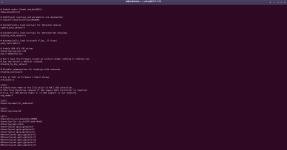
sudo nano /boot/firmware/config.txt

It should open the file, then scroll to the bottom and you'll see the following lines. If it looks exactly like below remove the # sign in front of #dtoverlay=w1-gpio,gpiopin=14 line.

dtoverlay=w1-gpio,gpiopin=4
dtoverlay=w1-gpio,gpiopin=22
#dtoverlay=w1-gpio,gpiopin=14
#dtoverlay=w1-gpio,gpiopin=15
#dtoverlay=w1-gpio,gpiopin=17
#dtoverlay=w1-gpio,gpiopin=18
#dtoverlay=w1-gpio,gpiopin=27
#dtoverlay=w1-gpio,gpiopin=23

Then press CTRL + S to save it, then CTRL + X to close. Then run the following command to reboot the Pi.

sudo reboot

When it comes back online it should detect it.

As for updating every 10 minutes or so, did you determine that from the app or from /sys/bus/w1/devices? The app reads the ds18b20 every 5 seconds or so but the dashboard only updates if the value changed. Try running the /sys/bus/w1/devices again while the sensor updates, get the sensor warm with your hands and dip in cold water so you know it's always changing, see if /sys/bus/w1/devices updates.

So I checked the config.txt file and all of those lines were already there. I know the sensor is good as I can swap it with one of the others and it shows up. Not sure why though.

I was just checking the app itself, which explains the updates.

The replacement power bar should be here tomorrow and then I get to play with getting things setup. I used reef-pi before so the app is brand new to me :)
Hmm, the sensors are all handled by the Pi, the app simply reads what the Pi sees. Are you sure the 3rd line #dtoverlay=w1-gpio,gpiopin=14 doesn't have the # in front of it. If it does that line is skipped. Glad the power bar is almost there, don't get water in it haha... :)
 
Hmm, the sensors are all handled by the Pi, the app simply reads what the Pi sees. Are you sure the 3rd line #dtoverlay=w1-gpio,gpiopin=14 doesn't have the # in front of it. If it does that line is skipped. Glad the power bar is almost there, don't get water in it haha... :)

Yup, it's uncommented. The 3rd sensor doesn't show in /sys/bus/w1/devices
 
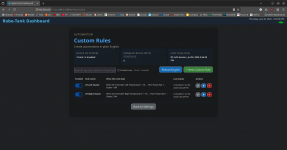
So I got the new power bar in today and have connected it. The internal green LED is on, but I cannot get any of the outlets to turn on. The UI shows that PB 1 outlet 1 is turned on, but when a clocked is plugged in there is nothing. Right now I have this setup with Custom Rules. One thing is unclear: are the rules based on Celsius or Fahrenheit? There is one place that says Celsius but the others are unlabeled. I'm guessing it's Fahrenheit as that at least got the outlet to say it was one.
 
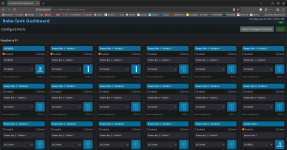
Here's the setup I have going right now. I'm using an alarm clock (which I have tested in other outlets in the house) on the ports on the power bar. After a reboot the custom rules are showing both heaters as on (PB 1 outlets 1 & 2) but none of the actually turn on. Here's the screen grabs:
 

Attachments

  • Screenshot From 2026-07-30 18-05-07.png
    Screenshot From 2026-07-30 18-05-07.png
    1.3 MB · Views: 4
  • Screenshot From 2026-07-30 18-05-21.png
    Screenshot From 2026-07-30 18-05-21.png
    2 MB · Views: 4
  • Screenshot From 2026-07-30 18-06-41.png
    Screenshot From 2026-07-30 18-06-41.png
    1 MB · Views: 4
Here's the setup I have going right now. I'm using an alarm clock (which I have tested in other outlets in the house) on the ports on the power bar. After a reboot the custom rules are showing both heaters as on (PB 1 outlets 1 & 2) but none of the actually turn on. Here's the screen grabs:
I did mess up on the temp C/F, I use C and didn't fully test F. The rules are in C even if sense or set to F but that's been fixed. Those outlets should be on based on < 78c.

Any chance you don't have a jumper in the AC1 and AC2 backup ports on the main controller?

If you click the blue "play" button for the rule does it turn on?

If you go to the main dashboard, click an icon in the outlet widget, can you manually turn it on/off?

For the temp sensor, I just tested one on the sensor extension and it worked fine. I'm also running 3 sensors so I know app is fine with that. Any chance you don't have the jumper above the green port set to PU? I just realized in the manual I don't mention that so maybe you only have the lower jumper set to enable the green port. Here's a link showing, the top jumper should be PU and the bottom jumper Sensor.


When you look at /sys/bus/w1/devices do you see 3 buses? Every port set to DS18B20 gets it's own 1wire bus.

w1_bus_master1
w1_bus_master2
w1_bus_master3

If you unplug the temp from main controller the dashboard widget should say unavailable after about 5 seconds, and when you plug into sensor extension it should reappear within a few seconds.

So I should set the rules based on degrees C? The graph is showing degrees F lol.

The rules do run if I click play, and it currently is running on automatic and shows both heaters on, although I have them unplugged so I can plug them into the wall to keep the tank alive.

There are no jumpers on the controller at all. Note that this is the same setup I used under reef-pi so I'm not sure why there's a difference. I will put jumpers across them (if I can find some) and let you know.

I can remote into the pi and it does show the w1_bus_master? for 1,2, and 3, but there are no sensors on bus 3.

Thanks!

Update: I put jumpers in the AC1 and AC2 backup ports, but no change after a reboot. Software still lets me toggle on/off manually but the alarm clock does not turn on. I've also tried all of the ports on the power bar in case the numbering has changed (you really need to number the ports on the case) but nothing changes.
 
Last edited:
I'm really confused here. I'm swapped the jumpers on AC1 and AC2, did a full power off/on, and then suddenly outlets 1 and 2 are working.

Still can't get the 3rd temp probe to work on Sensor 1.\

Edit: The rules don't seem to be triggering either. I can manually turn heaters on/off though.
 
Last edited:
Back
Top